What is UTM tracking?
"UTM" tracking, which stands for "Urchin tracking module", are parameters which are appended to the end of external links (for instance, links in emails, PDF downloads or Facebook ads) that tell Google Analytics additional information about how a user arrived on your site.
Why are they important?
Identifying how a user arrived on your site can be challenging at the best of times, and Google Analytics does its best to infer where a user was referred from. Often, we need a greater depth of information than the limited details that Google can provide 'out of the box', particularly when you have numerous marketing channels driving traffic to your site.
For example, knowing that traffic was referred to your site from Facebook is only useful until you require more granular details, such as which specific campaign drove the traffic, or how much was from paid advertising over organic posting? This is where UTM tracking comes in.
Establishing an approach to UTM tracking which is used uniformly across your external marketing campaigns is important because it enables you to better report on and ultimately understand how your campaigns are performing, as well as how these users engage with your website once they arrive.
Where do they show in Google Analytics?
Any time you look at reports that tell you how a user got to your site, you are looking at data which may be being modified by UTM tagging. The report which you will most commonly reference this information in is the Acquisition > All Traffic > Source / Medium report (pictured below):
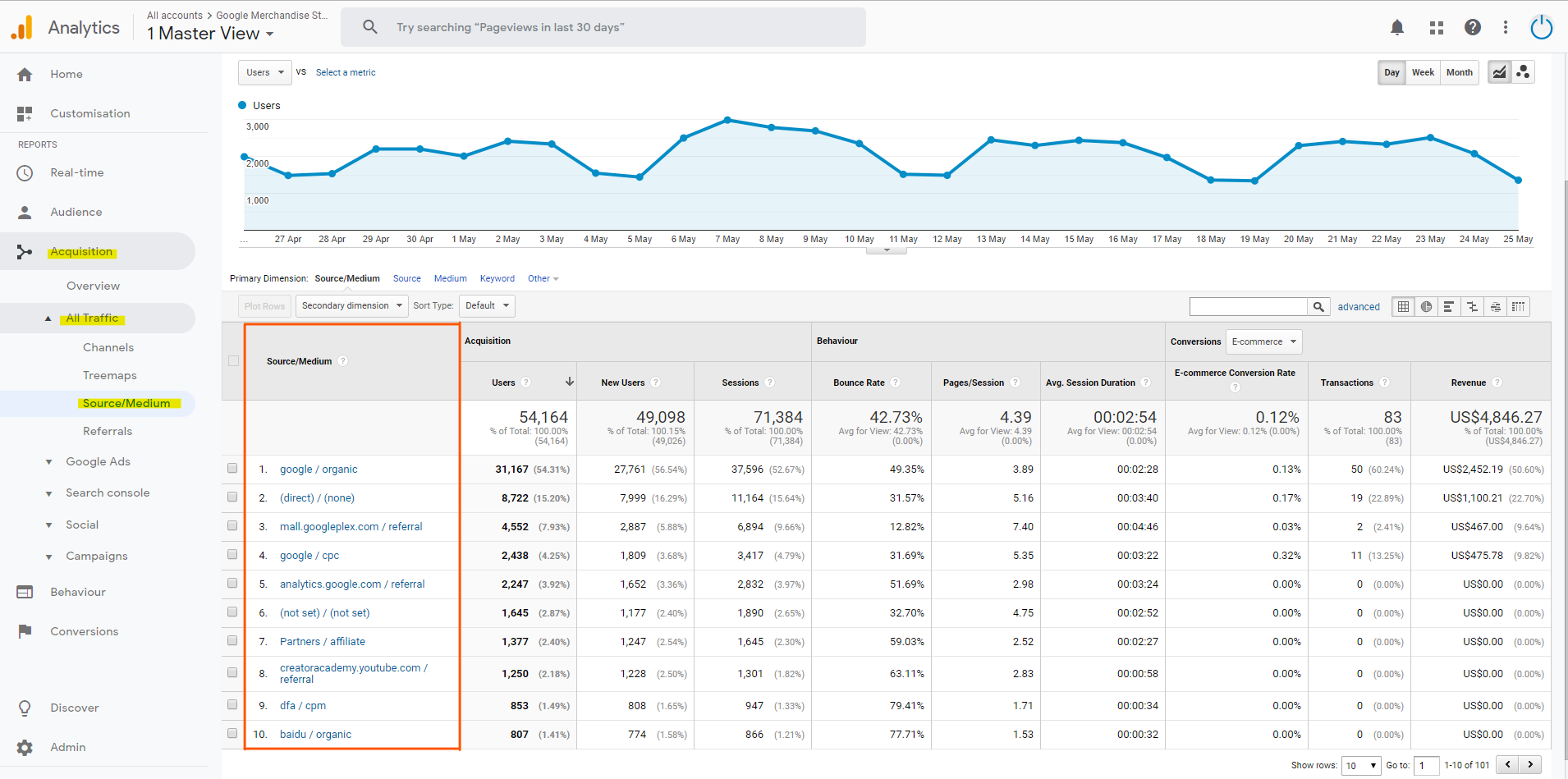 Click to view the full image.
What do I need to tag?
As a default, Google-specific platforms (such as Google Ads), don’t require UTM tracking and will automatically share detailed data with Google Analytics. It’s only when you start to use non-Google platforms such as Facebook, Twitter, Mailchimp etc.that we recommend implementing UTM tracking. Doing so will ensure these platforms “talk” to Analytics the way we need them to achieve clear and meaningful reporting.
If you were to use these non-Google platforms without UTM tracking, data would still be recorded in Google Analytics but it will be attributed to "Referral". Alternatively, if Google can’t find any information about the source, “direct / none” will be applied, and you will not be able to analyse how these campaigns and, where applicable, specific ads/posts have performed.
How can I get started UTM tagging?
Choose an approach that allows future users to determine critical information about the context of a users session on your site after arriving from your tagged traffic source. The approach you use should be guided by your reporting objectives and, to get the most value from your selected approach, be rolled out consistently across channels.
You have five UTM parameters to work with, each of which can be thought about as a bucket to contain information of your choosing. These parameters are as follows:
Source
REQUIREDThis parameter is used by Google Analytics as a reference to where the traffic is coming from (think of the platform/website). This could be Facebook, Google, Outreach etc.
This appears asutm_source in tagged URLs - for
example utm_source=facebook
Medium
REQUIREDThis should reference how the traffic is coming to you - the advertising medium used for instance. This could be CPC (cost-per-click/paid promotion), email, organic, blog etc.
This appears asutm_medium in tagged URLs - for
example utm_medium=cpc
Campaign
RECOMMENDEDThis is why your traffic is coming to you. For instance, the message or offer has brought the user to your website. This should be a reference to the initiative or name of the campaign in the platform - it might be something like “June – Catalogue Sales”.
This appears asutm_campaign in tagged URLs -
for example
utm_campaign=june+catalogue+sales
Content
RECOMMENDEDThis parameter can be used to identify which ads within the campaign drove the traffic. For example, you may be testing two versions of an ad using different ad copy and calls to action. You could label these "Lookalike Audience Female" or "Remarking List - Landing Page" for instance.
This appears asutm_content in tagged URLs - for
example
utm_content=remarketing+landing+page
Term
OPTIONALThis is the lowest-level parameter, and therefore provides the deepest level of granularity – for instance, either keyword level for Bing Ads (if you are running this channel) or ad level in Facebook (for example you would differentiate specific ads ie: Video Ad, Static Image Ad etc).
This appears asutm_term in tagged URLs - for
example utm_term=canvas+ad
You don't need to use all available parameters every time you UTM tag your URLs, nor do you need to use each parameter for the purpose that their name suggests it should be used for.
For instance, if you are running Facebook ads, you might be tempted to not use the ‘term’ parameter as there are not traditional terms/keywords associated with this channel. In this case, you might choose to use store the name of the audience you targeted in the ‘term’ parameter.
To get started, it can be helpful to establish a narrative that describes how a user got to your site, drawing form the below questions:
-
Where did a user come
from/which website? (
source) -
How did they find this
link to your site? (
medium) -
Why does this link exist in
the first place? (
campaign) -
Who is it that this link
would be exposed to? (
term) -
What content was this link
associated with? (
content)
You will note that each of these questions aligned to each available UTM parameter. Using the above as a reference, you can create a sentence that describes all the attributes, as demonstrated below:
“These users came from a Facebook Organic post which was part of the VIP Members campaign which was targeted to the General Public, and the post itself was a Branded Video.”
Don't worry if you can't form a sentence that uses all the fields - you should end up with at least the Where, How, and Why. This might seem like an unnecessary step (let's be honest, you probably haven't used the ‘5Ws’ approach since primary school) but it will help ensure you have a relationship between each value that is easy to reason about - as you get comfortable with your approach, you will be able to skip this step, but it’s a good way to build good tagging habits in the early stages.
Once you have put all this together, you will be able to extract the values from your sentences and structure them ready for use in your UTM tagged URLs - something like the below, for instance:
| UTM Tag | Example 1 | Example 2 |
|---|---|---|
| Where (source) | ||
| How (medium) | cpc | signature |
| Why (campaign) | promoted post | become a vip member |
| Who (term) | current non member customers | N/A |
| What (content) | family picture with 20% off | N/A |